
Adjusting the Carter AS Idle Mixture - Step by Step Instructions
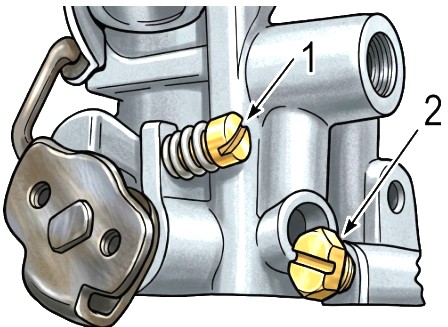
To adjust the idle mixture on a Carter AS carburetor, follow these steps carefully. This process ensures the engine idles smoothly and efficiently at low RPMs.

Tools You’ll Need:
Flathead screwdriver
Tachometer (optional but helpful)
Vacuum gauge (optional for precision)
Steps to Adjust Idle Mixture:
Warm Up the Engine
Start the engine and let it reach normal operating temperature. A warm engine gives accurate mixture readings.Set the Idle Speed
Set the idle speed to 500, or whatever your motors manual calls for. See #1.Locate the Idle Mixture Screw
The Carter AS carburetor typically has one idle mixture screw, located near the base of the carburetor, on the front or side. See #2.Turn Screw In (Clockwise) Until It Just Seats
Gently turn the screw in until it just contacts the seat. Do not overtighten, or you may damage the screw or seat.Back the Screw Out (Counterclockwise) About 1 to 1½ Turns
This is your baseline setting for the mixture.Adjust for Best Idle
Slowly turn the screw in ¼ turn at a time, then out again while listening to engine speed.
You want the highest, smoothest idle RPM without roughness or stumble.
If the engine speed drops or stumbles when turning the screw either way, go back to the point where it ran best.
(Optional) Use a Vacuum Gauge
Connect it to a full vacuum port.
Adjust the screw to achieve the highest steady vacuum reading.
Reset Idle Speed Screw (if needed)
After adjusting mixture, reset the idle speed screw (throttle stop screw) to the correct RPM per your vehicle's manual — usually around 500–700 RPM for most applications.
Tip: Repeat Fine Adjustments
If the engine responds sluggishly or stumbles when accelerating from idle, you may need to re-adjust slightly richer (screw out a bit).
